글

라벨이 Revit인 게시물 표시

Where to find Revit Journal files?
이미지
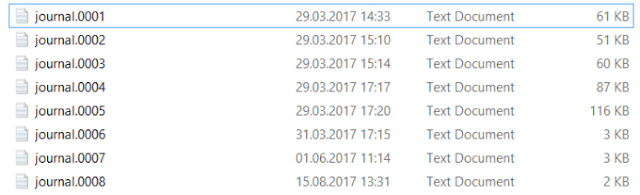
Revit journal file can be considered as a programmatic log that Revit records during the runtime. It records almost all histories including the user's interaction with the software like clicking. It is useful to automate certain processes from outside the Revit environment, unlike API or macros. However, where do you find the journal file? Here it is: C:\Users\[username]\AppData\Local\Autodesk\Revit\Autodesk Revit 2017\Journals When you go to the folder path as above, you will find files something like below: Revit Journal Files Try drag and drop this text file on the Revit shortcut icon. Something fun will happen immediately! Have a look at the official webpage from Autodesk as well! [This article has been copied from hojoongchung.wordpress.com. The original article has been written on Sep 12, 2017, 7:28 PM]

Revit Journal Scripting Example

I've tried making new file from revit and adding worksets in it using journal file. Here's an example code I've used. I will later use this journal file with Excel VBA to create folder structures and Revit files automatically. ' 0:< Initial VM: Avail 8388359 MB, Used 21 MB, Peak 45; RAM: Avail 11334 MB, Used 48 MB, Peak 45 Dim Jrn Set Jrn = CrsJournalScript Jrn . Command "Internal" , "Create a new project , ID_FILE_NEW_CHOOSE_TEMPLATE" Jrn . ComboBox "Modal , New Project , Dialog_Revit_NewProject" _ , "Control_Revit_TemplateCombo" _ , "SelEndOk" , "<None>" Jrn . ComboBox "Modal , New Project , Dialog_Revit_NewProject" _ , "Control_Revit_TemplateCombo" _ , "Select" , "<None>" Jrn . PushButton "Modal , New Project , Dialog_Revit_NewProject" _ , "OK, IDOK" Jrn . Directive "DocSymbol" _ , "[Project1]...

Exploring scripting capability in Revit: Using journal file and batch script

I am currently exploring and teaching myself the Revit Journal script and the Batch script. After spending somewhat 3 hours digging in, I was able to clean out the journal file and made sample code below for opening Revit file from journal script(.txt format) and changing color visualization of structural column. One thing not sure: without the first line of the script, which is commented out with ' symbol, the revit wouldn't open the designated .rvt file. I don't know why this happens yet. ' 0:< Initial VM: Avail 8388359 MB, Used 21 MB, Peak 45; RAM: Avail 11334 MB, Used 48 MB, Peak 45 Dim Jrn Set Jrn = CrsJournalScript Jrn . Command "Internal" , "Open an existing project , ID_REVIT_FILE_OPEN" Jrn . Data "File Name" , "IDOK" , "C: \1\r ac_advanced_sample_project.rvt" Jrn . Command "KeyboardShortcut" , "Control visibility and appearance of objects (applied only in the active view) , ID...

Revit API – Issue Spheres Generator

이미지
After developing the Revit macro that reads CSV and places the issue sphere into corresponding location, I wanted to have an UI so that user can specify which CSV file they want to read. So I started to transfer the macro code into Revit API code. Using Windows form and make Revit communicate with it wasn’t easy job; it required to use a method called BackgroundWorker and external event handler. I needed to use the backgroundworker because I wanted to show the progress bar moving during the sphere creation. To do it, code has to be executed into two different thread, one generating spheres, while other updating the progress bar. Also, I had to use external event handler since Revit did not allow external application or Windows form to access to themselves and do something. I’m a not very good programmer so it wasn’t easy for me to implement all these methods. Although the tool looks a bit simple, code behind it is not like it. Issue Sphere Generator UI and generated spheres ...